In these days of privacy protection, data/file encryption software plays a critical role. With appropriate file encryption software, one can protect valuable data. Classified data theft & exposure can result in financial losses if you’re in business. In a personal computer, file encryption software can be used to back up files, password protect folders, etc. In today’s article, we will discuss some of the best encryption Windows software.
Best Encryption Windows Software
1. Gihosoft File Encryption
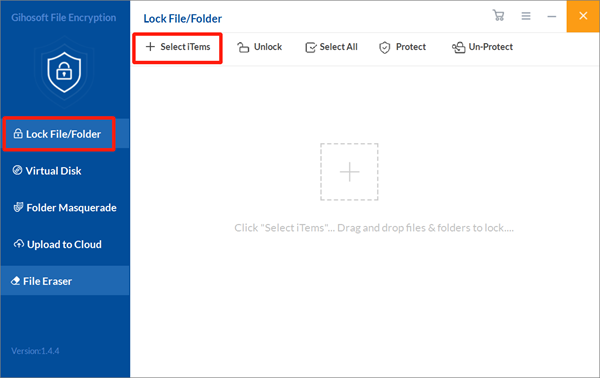
Undoubtedly, Gihosoft is one of the best file encryption software for Windows. With this, you can lock files & folders, create a virtual disk to password-protect files, make imitation files to confuse others, and upload files to the cloud. As handy file encryption software for Windows, it mainly adopts a password to protect your essential or sensitive data/files. Only those aware of the correct master password can open this program to access unrelated data/files.
With a clean and intuitive graphic user interface, this program can allow you to quickly find the function you need, making it easy to use. It supports encryption for both folders and various file types, including Excel files, image files, and Word files. Moreover, you can create a virtual disk. You can put files/folders to get file/folder encryption too. Please note that you can download this file encryption software to try before purchase.
2. AxCrypt
AxCrypt is designed mainly for home users & small teams in businesses. The product is reliable and powerful. It provides you with all the tools you need to secure & protect files. Files can be protected with either 128-bit or 256-bit AES encryption, which should easily stop intruders. They also offer cloud storage abilities as part of their service.
This software can automatically protect files saved on cloud storage like Google Drive & Dropbox. Files not on your machine are also protected with AxCrypt. It is multilingual & already works with more than a dozen different languages. There is also passport management and a very competent app that you can use to manage all your files. There is a free version of this software, but it comes with some limitations.
3. VeraCrypt
VeraCrypt is another useful file encryption software that is free to download on Windows, OS X, and Linux. It is a division & successor of TrueCrypt. It typically uses AES to encrypt files with TwoFish & Serpent. Besides the encryption for separate folders of files, VeraCrypt can create a virtual encrypted disk in a file or use a pre-boot verification to encrypt the partition or (in Windows) the whole storage device.
Users claim it as an instant encryption tool because your files are only decrypted when required & are encrypted at all other times. Simultaneously, many say that even if it lacks a stylish interface, it is still easy to use the potent tool. You can also notice that VeraCrypt may not support TrueCrypt files and containers, but it can convert them to a supported format. Its development team is continually working hard to develop the user experience, making it more functional.
4. 7-Zip
7-Zip is known to be the best free encryption software for Windows. It is usually used to place files in a compressed container called an “archive.” But besides that, it is excellent file encryption software for computers. It is principally compatible with Windows, OS X, and Linux operating systems.
It is worth mentioning that the official download of this file encryption software only supports Windows systems. Still, various unofficial versions support Linux & OS X systems. 7-Zip can convert a single file or a complete volume into an encrypted volume with only the key you possess.
This program is free, even for commercial use, and it supports 256-bit AES encryption. In addition to the security key, a single file can also be encrypted with a password and converted into an executable file that will self-decrypt upon reaching the intended recipient.
5. CryptoExpert
Many claim that you won’t find better encryption software than CryptoExpert. It provides secure vaults for all of your data & ensures that it stays protected from any potential threats. CryptoExpert offers possibly the most powerful encryption among all the encryption software.
It offers fast, prompt protection that is highly sought after. The system lets you back up many files, including certificates, Word, Excel & PowerPoint files, multimedia files, and email databases. The most intriguing thing about CryptoExpert is that it can secure vaults of any size. It employs Blowfish, CAST, 3DES, and AES-256 encryption algorithms.
6. BitLocker
BitLocker is a total volume encryption tool built into Windows systems, and it supports all Windows versions starting with Windows Vista. In other words, it gets data protection primarily by offering encryption for the entire volume.
By default, it employs the AES encryption algorithm in the Cipher Block Chaining (CBC) or the XTS mode along with a 128-bit or 256-bit key. It offers users a variety of authentication mechanisms, with the most common being the traditional password and USB key.
Read More: 9 Benefits of Using End-To-End Encryption
7. Folder Lock
Presented by NewSoftwares, Folder Lock offers hardened data encryption services for individuals. Moreover, Folder Lock is a brilliant choice if you are trying to encrypt your mobile devices. This service will let you add encryption to any device that contains critical data.
The software will protect your files, photos, videos, contacts, wallet, notes, and audio stored in your handset. It offers you some other impressive security features as well. You can access the encryption software, set a trick password along with hacker prevention measures, track unauthorized login attempts, back up your passwords, and receive notifications about potential brute-force attacks.
8. DiskCryptor
This one is another excellent choice for the users as free, open-source, and encryption software. This software can encrypt or secure the data present in your computer’s internal or external hard disks. Even the system partitions & ISO images can be encrypted using this awesome software.
The easy-to-use interface of this software is remarkable; it lets you operate it without any trouble. DiskCryptor is a complete disk encryption tool, although it was originally designed for partial disk encryption. Multiple encryption methods or algorithms are working behind this software’s functionality, like AES encryption, Twofish encryption, and many more secure encryption methods.
All you have to do is click on the “Encrypt data” option in this software & select the parts of the disk you want to encrypt. After selecting the files, advance to further guidelines to complete your encryption task. DiskCryptor is very easy to use, even for novice users, and encrypted data is secured with this software.
9. Boxcryptor
Boxcryptor is another of the best encryption Windows software available in the market. It offers end-to-end encryption for cloud storage services. If you are an individual or running a business that mainly uses cloud storage rather than on-premise services, then Boxcryptor should be a service that you can look at.
What Boxcryptor does that other encryption software services don’t offer is they provide cloud encryption software for 30 of the most popular cloud services. These include cloud storage like Dropbox, Google Drive, and Microsoft OneDrive. They do this by employing a combination of AES 256-bit encryption & RSA encryption.
The main focus of Boxcryptor is to make it as easy as possible for users to provide encryption across multiple services & mobile devices.
Conclusion
Choosing the best encryption Windows software that is right for you does not have to be complicated. Just take your time & go over the pros, cons, and pricing of all the options you are interested in. You can’t go wrong using any encryption software programs on this list.
The one you finalize will be based on personal opinion and what might be right for your business based on your requirements. Either way, finalize one after some careful consideration.