
Photographers and digital artists have limited ways to protect their intellectual property on the Internet. Even if you upload your images to a stock photo website, there is no guarantee that your photos will not be used without your permission.
One of the most effective ways to deter intellectual property theft is to watermark images before uploading them to your website or social media. This is where some of the best photo watermarking software may be useful.
Best Photo Watermarking Software
1. iWatermark Pro
This cross-platform software can be used with image editors such as Lightroom, ACDSee, or Photoshop or as a separate application. Moreover, iWatermark Pro supports popular image formats like JPEG, PNG, and TIFF and offers extended options; RAW files can be watermarked, although many workflows require converting them first.
The software’s list of watermarking options includes choices such as Signature, Arc Text, StegoMark, or Metadata, which lets you add visible and invisible watermarks to your images and videos. iWatermark also comes with a batch processing option to add watermarks with the same settings to several images altogether.
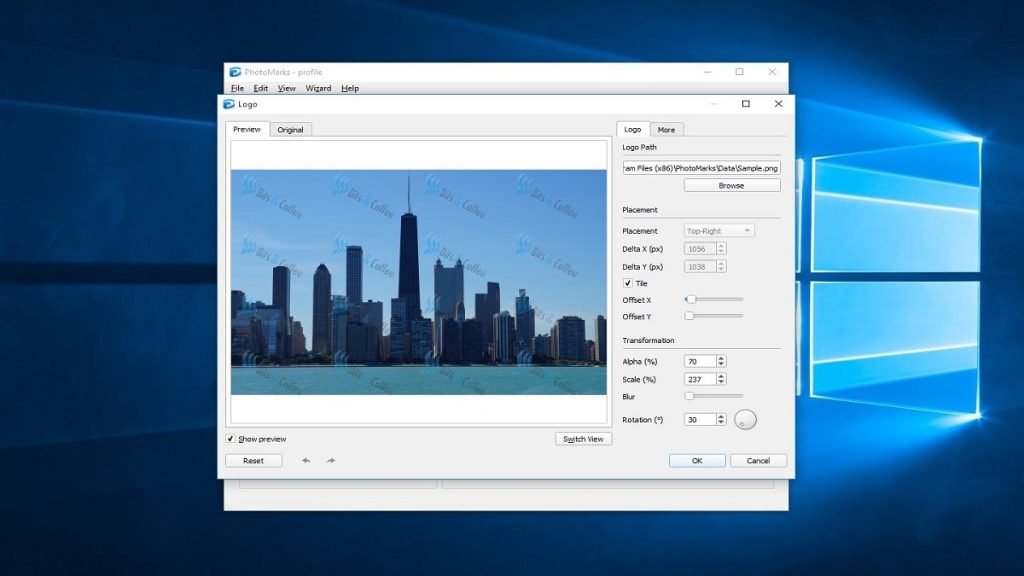
2. PhotoMarks

PhotoMarks is a watermarking software that works on Windows, macOS, and iOS devices (including iPhone/iPad), which makes it suitable for editing and watermarking images while on the move.
This watermark software can layer several lines of text over pictures and insert text effects such as stroke or shadow, making it perfect for photographers and other visual creators.
3. uMark
uMark is available in separate versions for photos and videos, depending on your needs. The app lets you use both text and images as watermarks on your images, and it also comes with robust batch processing options that automate the procedure of watermarking lots of images.
Besides conventional watermarking options, uMark allows you to watermark photos with unique QR codes or different shapes. You can easily personalize all the watermarks you create with this application or save them if you want to use them in the future.
4. Format Factory

Format Factory is a free Windows media tool that includes basic watermarking features alongside format conversion. Able to handle both still photos and videos, it appeals to users who work with both media types.
It’s a flexible desktop application that supports video files with audio tracks. Besides being a watermarker, this one can convert various audio and video files to the desired format.
5. Arclab Watermark Studio
Arclab Watermark Studio provides a focused but sufficient set of watermarking tools; the software offers all the tools needed to personalize a watermark. You can select the font and size of the text or tweak the opacity of each watermark you create with this software and even use your logos as watermarks.
The option to include numerous watermarks in a single image is also available, and the batch processing feature allows you to apply the same watermark to an unlimited number of images. This software comes with image resizing tools, which makes it an ideal choice for photographers who post their snaps on social media.
6. Mass Watermark
As its name indicates, Mass Watermark is created to make watermarking large numbers of photos quick and simple. Besides powerful batch processing features, this watermarking software for Mac and Windows computers comes with image optimization tools that help you improve your images’ overall quality before you put a watermark on them.
This software’s Watermark Designer allows you to customize every watermark you create, while the Crop, Rotate, and Resize features allow you to optimize your images for online use. Moreover, you can export your photos in formats optimized for platforms such as Flickr directly from Mass Watermark.
Read More: 9 Data Enrichment Tools for Converting More Leads
7. TSR Watermark Image
Professional photographers with prior experience with photo editing applications won’t require much time to get familiar with TSR Watermark Image. Apart from the fundamental text and image watermarking options, the software also provides the 3D watermark option. Images that retain camera metadata (EXIF) can also be watermarked using metadata-based options.
The TSR Watermark Image app contains a rich collection of special effects, borders, and shapes that help you to create stylish watermarks. The free version of this image watermarking software provides only some limited options. Additional fonts and advanced features are available in paid plans.
8. Star Watermark
Customizing every watermark you create with this cross-platform software is a simple process that can be completed quickly. You can easily modify the size of the text, alter its color, add shadow effects, or place the text anywhere in the image. Star Watermark allows users to use images as watermarks or even generate multilayered watermarks.
Batch processing is one of the main reasons professionals choose this software. The downside is that the app offers moderate customization options but lacks invisible or signature-based watermarking, and it doesn’t let you use your digital signature as a watermark.
How to Choose the Best Watermarker Software?
Before choosing one of the best photo watermarking software, you must consider some points. The software should be user-friendly and robust enough to process batch files quickly and operate reliably without glitches or crashes. Here are some more aspects to consider:
- Up-to-date versions.
- Supports a wide variety of systems, including Windows and macOS.
- Simple and user-friendly graphical user interface.
- Constantly offers good results.
- Stable operation without glitches or crashes, even when processing large files.
- Support for both single-image and batch processing.
FAQ
Q: Can I use the photo watermarking software for free?
A: Most of them provide limited features in free versions. To get more, you need to buy them.
Q: Can I watermark in Photoshop?
A: If you have knowledge of layers and transparency and how to work with them in Photoshop, you certainly can.
Q: Why should I watermark my images?
A: To protect one’s intellectual property rights and to prevent your images from being used or misused without your permission, you must use a watermark on images.






I am extremely impressed with your writing talents as neatly as with the structure to your weblog.
Is this a paid subject or did you customize it your self?
Anyway stay up the nice high quality writing, it’s rare to look
a nice weblog like this one nowadays.
Thank you so much! I took the time to customize the blog myself. I’m thrilled you like it and appreciate your kind words!