Anyone who records audio to produce work, school, or entertainment content knows the significance of recording good-quality audio. The process starts with choosing the best audio recording software. The right software may look different based on your requirements. You will have different requirements if you are recording alone or hosting some interviews with guests.
Luckily, there’s software suitable for all use cases. However, it often happens when the recorded voice is hardly audible or of poor quality. It is usual to find faults with a mic when things like this happen, but your microphone may not be the only thing to blame for poor voice quality.
The voice recording software you use can significantly influence the final audio quality. Good audio recording software can help capture cleaner, more accurate sound, while poorly optimized software may degrade audio quality.
Best Audio Recording Software
1. Audacity
Audacity is considered one of the best audio recording software options that offers users many features despite being free and open source. This software supports almost all operating systems, including Windows, Mac, and Linux. It comes with a very clean interface that doesn’t overwhelm users with needless graphics and strange aesthetics.
Regardless of being simple in its looks, it is unique in the features it offers. You can effortlessly set up external equipment to start recording, then use the software to easily record, edit, and mix audio to your satisfaction. You can also use the software to adjust treble and bass while having frequency analysis.
2. Riverside.fm
Riverside is a strong choice if you are searching for professional-quality audio recording software at a reasonable price. As a browser-based platform offering local 4K video and high-quality audio recording, Riverside can deliver reliable results regardless of your chosen format.
Thanks to its local recording and high-quality audio capture, it is a strong option for remote recording. You can record with up to 8 members regardless of their location, with the assurance of the excellent quality of your recording.
3. WavePad
Regarding sensitive voice recording software, WavePad ranks highly among voice recording software options. It has a clean and basic UI (user interface) but offers a collection of advanced features that justly earn it a place on this list. You can use this software to record audio, mix it, edit silences, and remove background noise.
The tool comes with a customizable toolbar that lets users remove and configure tools within the software per the users’ preference. This helps the users to generate a more personalized experience.
WavePad also offers an assortment of filters and effects that can be added manually or automatically to improve the quality of your recording. You can apply effects such as distortion, reverb, amplify, and fade out while also customizing and equalizing the soundtrack.
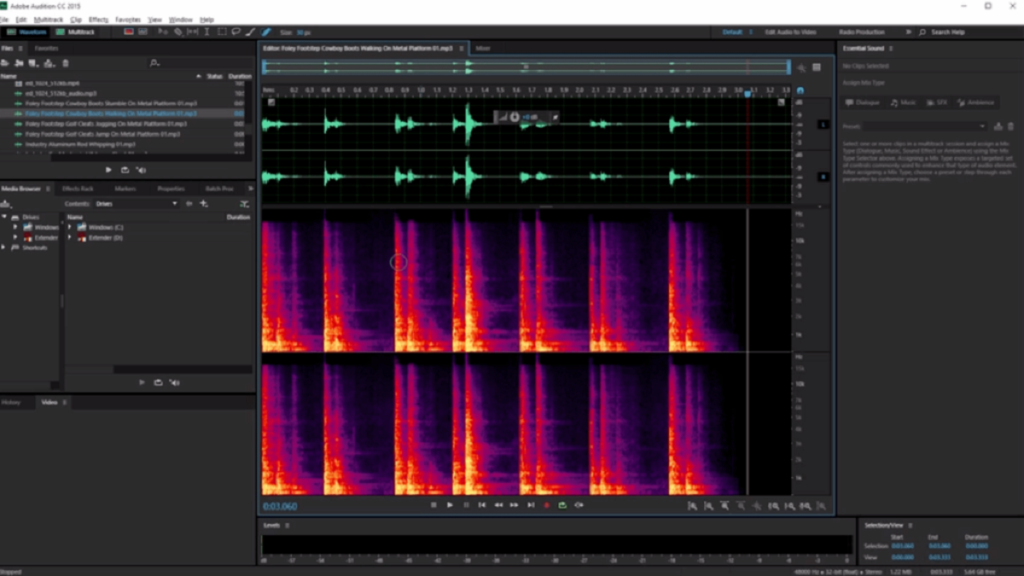
4. Adobe Audition
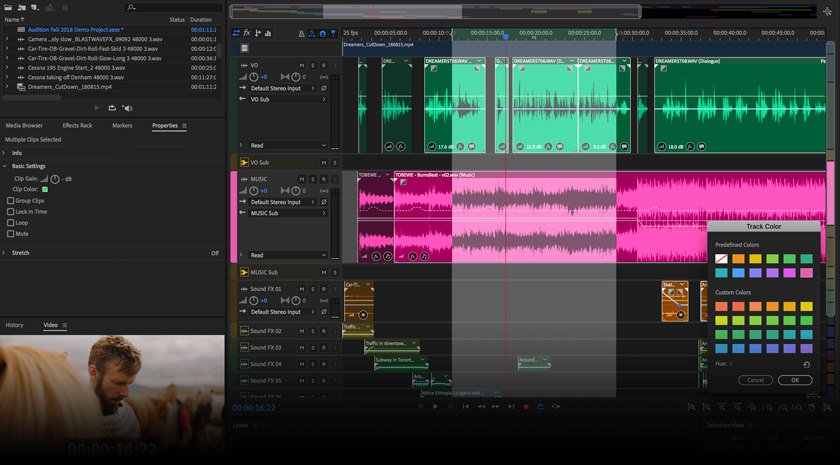
No list of multimedia products would be complete without a product of Adobe. Many professional content creators, particularly those from the podcast world, use this software to record and edit their content.
This audio recording software offers many features you can use to create a professional-quality podcast. While it is not focused on music composition like a DAW, there may be better options if you are recording music.
It is considered one of the best voice recording software options. Adobe Audition is widely used by podcasters and audio professionals; it’s an excellent recording option for podcasters who can afford it.
5. Apple GarageBand
Even though GarageBand is good voice recording software, it is particularly famous in the music community for being a robust musical workstation. That is mainly because it comes with a complete set of musical software that helps you to create beats with natural-sounding voices and a collection of musical instrument effects.
The software offers many presets for guitar, piano, drums, and many more, which can be used to produce exclusive musical numbers without using any instruments. The tool provides several great amps and effects that can be used with your recorded audio to create remarkable music. GarageBand is exclusive to macOS and iOS devices.
6. AudioDirector
This remarkable voice recording tool contains features that help you have crystal-clear speech in your audio recordings. It has a collection of tools to remove noises like plosives, clicks, pops, hisses, and other interference sounds from your recordings. This software can create professional recordings with a powerful and balanced sound.
A powerful feature of this tool is that it supports multi-channel device recording and batch processing. This application’s voice-focused features make it an excellent choice for podcasters, interviewers, and singers.
Read More: 8 Advantages of Audio Visual for Business
7. Ocenaudio
Ocenaudio is a smart editing tool that handles most recording and editing tasks efficiently. It is a tool that seeks attention from users who want a more automated response from their editing software.
Ocenaudio is an excellent audio recorder but functions primarily as a lightweight yet powerful editor. The tool packs its many advanced options in an excellent-looking user interface that is user-friendly. The tool lets users apply lots of audio effects and preview them in real time during the editing process.
You can also select numerous parts of the same audio to edit, listen to, or insert effects. This software is one of the best cross-platform audio editors on the market. It works amazingly well on Windows, Mac, and Linux.
8. Reaper
Reaper from Cockos offers much value for your money but has a steeper learning curve for beginners. You must have a little experience if you wish to use Reaper as your primary audio recording application.
The interface may feel less intuitive for beginners, and users new to digital audio workstations may feel overwhelmed. If you know what to do, Reaper is powerful software for multi-channel audio recording, editing, mixing, and mastering.
9. Wavosaur
This software’s user interface may feel old-school in its appearance. Still, this audio recording solution is efficient and is packed with features to enhance the quality of audio recordings.
The program will only eat up a little space on your system (the setup file is very small compared to most editors), and all edits are non-destructive. Wavosaur is an excellent option for beginners in audio editing because any mistakes can be fixed by clicking the “undo” button.
What Are the Audio Formats Supported by Audio Recording Software?
Every software will support various audio formats. Check the specifications to know which audio formats this best audio recording software supports. Ensure the software you select can export the file type you want if your social platform or streaming service needs audio files in a specific format. Some of the most popular audio file formats are:
- MP3
- MP4 (a container format for audio and video)
- M4A
- FLAC
- WAV
- AAC
FAQ
Q: Is this best audio recording software free?
A: Some are free. Some offer limited functionality in the free version. To unlock all the features, you must buy them.
Q: What additional features can be found in audio recording software?
A: The capability to edit and add filters and effects is a feature that most audio recording tools should have. The feature of trimming an audio file, removing background noise, and adding filters and special effects can increase the overall quality of your audio.
Q: What audio input sources let you capture audio on a mobile or computer?
A: Audio can be captured by a microphone. Advanced software helps you capture audio through multiple input sources like media playback devices such as CD, DVD, USB, phone recording, internet streaming, and sound card.