
They say, “Time and tide wait for none.” We cannot buy or store time, but we can manage and utilize it to maximize our output and efficiency. A time management app is an important tool that can help you and your team to be more organized and proficient and get more things done. The best time tracking apps can do much more.
To make it simple, a time-tracking app will save you and your organization valuable time and money. The main thing is that hundreds of options are available with numerous features. Productivity monitoring, GPS tracking, invoicing, and much more. Therefore, we have listed some tools to help you manage and utilize your time more efficiently.
Best Time Tracking Apps
1. My Hours
With many years of experience, My Hours is built with one task in mind—tracking time so you can run projects more efficiently. The app is excellent at simple time tracking (timesheet or real-time tracker) and sophisticated but precise reporting. With unlimited projects, tasks, clients, and team members, you can manage small or large teams to run various projects from start to finish.
You can organize your projects, track your time, analyze reports, and create invoices all in one app. With a rich collection of features, My Hours easily becomes one of the best time tracking apps when it comes to user experience and price performance. Last but not least, My Hours is known for its responsive customer support and user-friendly interface, making it one of the most reliable time-tracking tools available.
2. Paymo
Paymo, now a project management app, started as a simple time-tracking app for freelancers. The time-tracking core feature has kept its freshness in due course, letting you track time in different ways: manually, in bulk for one week, or via the web timer, which gets frequently upgraded. You can change tasks midway and see which ones you have tracked for today and the past days.
Time records are listed automatically under a traditional timesheet, so you receive all the essential insights to run a team. Paymo’s native invoicing component lets you bill your clients by turning timesheet data into an invoice with a single click. It’s an excellent choice for an invoice builder found online. The tool also offers desktop-based apps (Windows and macOS).
3. Timely

Timely is an AI-powered, cross-platform time tracker that automatically records activity across devices. The best thing about Timely is their task planning aspect. You can manage the tasks by dragging and dropping on the Gantt charts in a visually gratifying way.
This helps with proficient project timeline planning, which is vital for successfully completing the project. Memory (the company behind Timely) emphasizes building privacy-first productivity tools with strong data security.
4. DeskTime
DeskTime is a user-friendly time-tracking app with vital features—employee monitoring, project management, and efficiency analysis. Additionally, this employee efficiency tracking software is designed to help managers and their teams to spot their unproductive habits by automatically categorizing websites and apps as “Productive” or “Unproductive,” which users can adjust as needed to refine accuracy.
DeskTime not only tracks time but also automatically analyzes your daily output and efficiency based on your classification of URLs, programs, and apps, which means the more time you spend on useful applications, the higher your daily output is.
5. Harvest
Harvest is a time-tracking app that offers comprehensive time tracking and invoicing features suitable for freelancers and teams alike. If you are searching for a time tracker app with billing and accounting features equivalent to simple accounting software, Harvest is a good choice.
Reminders for presenting timesheets and features like PayPal and Stripe integrations that let your clients quickly pay bills online are other helpful advantages that Harvest offers. You can track time on your desktop or mobile or by combining Harvest with your favorite app. You can do that via Zapier, their native integrations, or a browser extension—their list of integrations is long.
6. Clockify
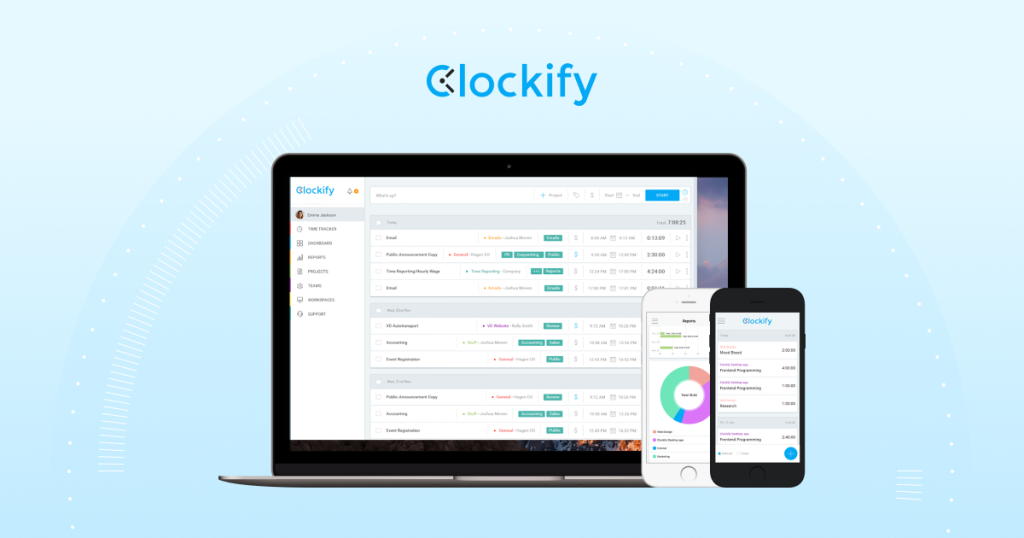
Clockify is one of the most widely used free time-tracking tools, offering unlimited users and projects even on its free plan. It offers transparent paid plans, though some users note the detailed pricing information is less prominently displayed on its homepage.
However, Clockify offers a balanced mix of simplicity and functionality found in tools like Timely and Harvest. The time tracker comes with a ribbon-like design where you can type in the task you are working on, hit play, and fill in the particulars later.
Unlike other apps, Clockify requires assigning each time entry to a project, ensuring better organization and reporting. Time entries are shown one after another in a list format, but you can also view them in a weekly timesheet like Harvest to add time in bulk.
Read More: 8 Automated Payroll Software To Save Time
7. Hours
Hours is a time clock app with fundamental time-tracking features—ideal for individuals or small teams seeking a simple, mobile-friendly time tracker without complex integrations. Available as a mobile app, Hours lets you keep a running list of timers and swiftly switch between your tasks.
In this app, you can organize your tasks and projects by color-coding them. By applying a particular color to a task or project, you can easily distinguish between them. The timeline in the app allows you to quickly adjust your recorded timestamps whenever. For instance, if you started a task at 9:00 but forgot to switch the timer until 09:20, you can adjust it by dragging the start time to 09:00.
8. QuickBooks Time
QuickBooks Time (formerly TSheets) offers all the primary time tracking features and integrates seamlessly with QuickBooks accounting and payroll, providing synchronized timesheets and scheduling. It helps organizations monitor employee productivity in real time and ensures accurate job costing for every project.
QuickBooks Time makes managing your workforce easier for both on-site and remote workers with its easy-to-use interface and detailed reporting capabilities. It also includes GPS tracking and mobile clock-in, making it ideal for field teams.
9. Toggl Track
Toggl Track is one of the most used and popular time-tracking apps out there. It stands out for its simplicity, colorful interface, and cross-app time tracking with powerful reporting and idle detection. The app works perfectly on all platforms.
Additionally, Toggl provides browser extensions (Chrome and Firefox) that let you track time in other apps like Asana, Trello, and Todoist, but these are lightweight integrations rather than full app connections. Another helpful feature, besides all the “must-have” ones, is idle detection, where the app tells you when you aren’t using your computer and asks to correct your timeline.
Why Are Time-Tracking Apps Becoming Important?
Time tracking is seen as a necessary and vital task. We have been using clocks for a long time, and lately, we have been using the best time tracking apps to highlight our habits, progress, and operations in every possible aspect. The lack of time-tracking habits can cause failure, frustration, and resource waste.
While these advantages might be evident for business owners and project managers, it can seem like employees and freelancers are getting a taste of it. As stated earlier, time is a resource that cannot be bought or renewed; everyone is trying to utilize it to stay at the top.